
How I Built an AI Running Coach With Claude, a Raspberry Pi, and My Garmin Watch
I'm training for the Lisbon Marathon. Like a lot of data people, I went and bought a Garmin 265s, strapped it on, and immediately started drowning in data — VO2 max, training load, heart rate zones, cadence, ground contact time. Garmin gives you a firehose of metrics. What it doesn't give you is someone to make sense of it all.
I had a training plan in a spreadsheet. I had the watch collecting data on every run. But the gap between those two things — the "how did today actually go vs what was planned, and what should I adjust?" — was something I was doing manually. Opening the spreadsheet, cross-referencing with Garmin Connect, doing the mental math.
I didn't want to pay for a human running coach. I knew enough about running to interpret my own data — I just didn't want to spend the time doing it after every session. So I built an AI coach instead.
What It Actually Does
The system does two things:
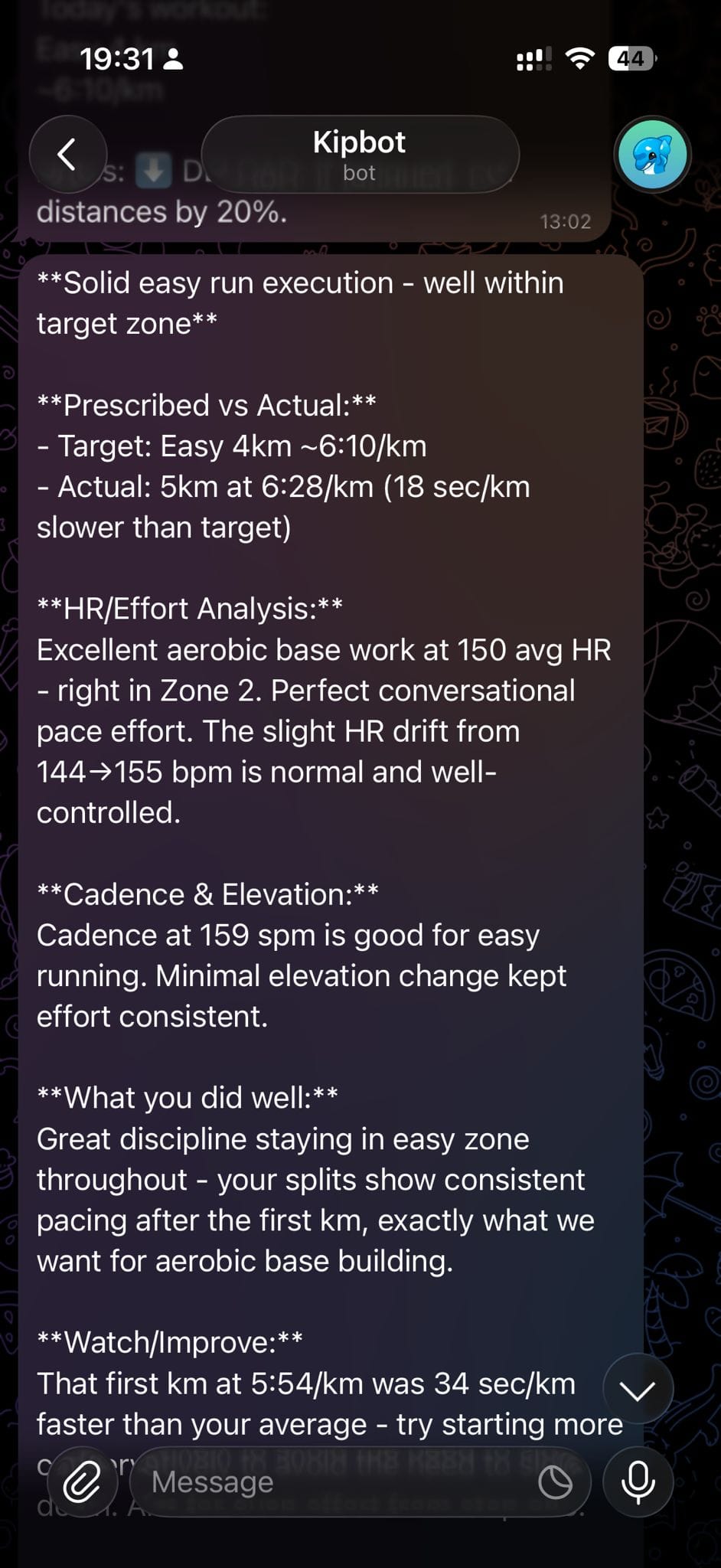
1. Automatic post-run analysis. It polls my Garmin Connect account for new activities every two hours — an arbitrary interval that's easy to adjust, but more than enough when you're doing one run a day. When it finds a run, it pulls the full session data — pace, splits, heart rate, distance — and compares it against what my training plan prescribed for that day. Then it sends me coaching feedback via Telegram. I finish a run, and within a couple of hours I get a message breaking down how it went. No action required on my part.
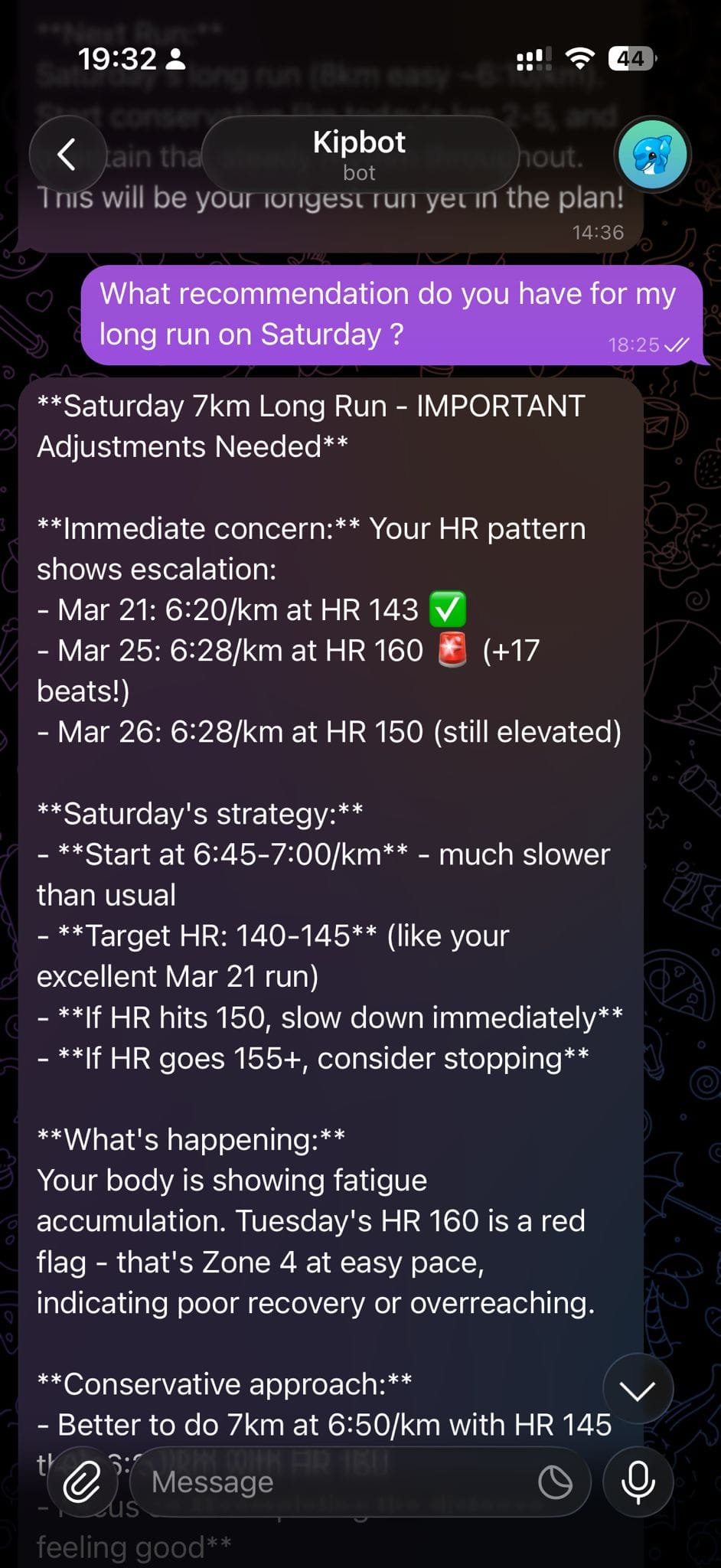
2. Interactive coaching chat. I can message my coach anytime through Telegram and ask questions about my training. Things like "am I on track this week?" or "my calves have been tight, should I adjust Thursday's tempo run?" It has full context of my training plan and run history, so the answers are specific to me — not generic advice.
There are also a few quick commands:
/today— what's on the plan for today/week— overview of this week's training/status— recent training summary and progress check
These replaced the habit of opening my spreadsheet every morning to check what I was supposed to do.
The Architecture
The whole thing runs on a Raspberry Pi sitting on my desk. Two background services, one database, and a training plan in Excel.
Garmin Connect ──(every 2h)──> Poller ──(new run?)──> Claude Analysis ──> Telegram
                                  │                        ↑
                                  └── SQLite ←── Training Plan (Excel)

Telegram user ──(message)──> Bot ──> Claude Chat ──> Reply
Garmin Connect Integration
The garminconnect Python library handles authentication and data retrieval. The poller runs on a systemd timer every two hours, checks for new activities, and stores them in SQLite. It tracks what's already been processed so it doesn't send duplicate feedback.
The data I pull for each run includes: distance, duration, average pace, splits per kilometre, average heart rate, max heart rate, and elevation gain. Garmin's API gives you a lot more, but these are the metrics that matter for marathon training.
The Training Plan
My training plan lives in an Excel file with three sheets:
- Training Plan — the week-by-week schedule with prescribed sessions (distance, pace targets, session type)
- Pace Guide — my pace zones with corresponding heart rate targets
- Race Day — pacing strategy and fueling plan for the marathon itself
The openpyxl library parses this on startup. When analysing a run or answering a question, Claude gets the relevant portion of the plan as context — what was prescribed that day, what the weekly volume target is, and where I am in the training cycle.
Claude as the Coaching Engine
This is where it gets interesting. Claude (via the Anthropic API) powers two functions:
Post-run analysis: When the poller detects a new run, it assembles a prompt containing the run data, the day's prescription from the training plan, and recent training context from SQLite. Claude then produces a coaching summary. The prompt explicitly structures what I want back:
- One-line verdict (e.g. "Solid easy run, right on target")
- Prescribed vs actual comparison
- HR/effort analysis
- One thing done well
- One thing to watch or improve
- Brief look-ahead to the next scheduled run
This structure keeps the feedback consistent and scannable in Telegram. Without it, Claude tends to write essay-length responses that are technically good but not useful when you're glancing at your phone post-run.
Interactive chat: When I send a message via Telegram, the bot passes it to Claude along with my training plan context and recent activity history. It maintains the last 10 messages for conversational continuity, so follow-up questions work naturally. This is where having the SQLite database pays off — Claude can reference my actual training data, not just the plan.
The system prompt is where the real coaching happens. It's rebuilt on every API call so the training week is always current. It includes my target race (Lisbon Marathon, sub-4:00), the training phase I'm in (Adaptation, Base Building, Specific Prep, or Taper), my pace zones, and benchmark targets. The coaching style section is what took the most iteration — the key constraints are:
- Flag potential injury risks (HR drift, pace inconsistency, overtraining)
- Keep messages under 2000 characters for Telegram readability
- Use specific numbers from the data, not generic advice
- Only suggest adjustments when the data actually warrants it
That last point matters. Early versions of the prompt produced a coach that wanted to change the plan after every run. Adding "suggest adjustments only when data warrants it" made the feedback dramatically more useful.
Telegram as the Interface
I chose Telegram because it's the lowest-friction interface possible. No app to build, no web UI to maintain. The python-telegram-bot library handles all the bot logic. Messages arrive, get routed to Claude with context, and responses come back.
The /today, /week, and /status commands are just structured prompts that pull specific slices of the training plan and recent data.
SQLite for State
SQLite stores three things: processed activities (so the poller knows what's new), Garmin session tokens (to avoid re-authenticating constantly), and conversation state for the chat. It's a single file on the Pi — no database server to manage.
systemd for Reliability
Both the Telegram bot and the Garmin poller run as systemd services. They start on boot, restart on failure, and logs are accessible via journalctl. This is the Raspberry Pi sweet spot — it just sits there and works.
What It Costs
Less than you'd think. The entire month of March cost me $0.32 in API calls. The Raspberry Pi draws negligible power. Telegram is free. The whole system runs for essentially nothing — a fraction of what a single session with a human coach would cost.
Performance-wise, once the poller picks up a new activity, Claude returns the full analysis in under a minute. The interactive chat responds in seconds.
What I Learned
LLMs are surprisingly good coaches when you give them structured data. The quality difference between "give me running advice" and "here's my actual heart rate data, split times, and training plan — analyse this specific run" is enormous. Context is everything.
Prompt tuning is an ongoing process. One recurring issue: if I stopped my watch slightly late and recorded 5.2 km instead of 5 km, the coach would critique the pace on that final 0.2 km fragment — which is meaningless data from me fumbling with the watch. It took prompt refinement to get Claude to ignore partial splits. These edge cases only surface through real usage, not upfront design.
The best interface is no interface. I considered building a web dashboard. I'm glad I didn't. Getting a Telegram message after a run that I can glance at and move on is exactly the right level of interaction. When I want to go deeper, I type a question. That's it.
Excel is fine. My training plan is in a spreadsheet. I could have built a database schema, a plan editor, an input form. But the spreadsheet works, my coach (Claude) can parse it, and I can edit it easily. Don't over-engineer the parts that aren't the bottleneck.
A Raspberry Pi is an underrated deployment target. Zero ongoing hosting costs, always on, and systemd handles process management. For personal tools that don't need to scale, it's hard to beat.
There's room to go deeper. The analysis can sometimes be generic when it only has pace and heart rate to work with. I'm exploring pulling in additional Garmin wellness data — sleep, HRV, body battery — to give the coach a fuller picture. A bad run might be explained by a poor night's sleep, and the coach should be able to connect those dots.
Try It Yourself
The project is open source: github.com/Samanvay96/ai-running-coach
You'll need a Garmin watch, a Telegram account, and an Anthropic API key. The setup script handles the rest. Fork it, adapt the training plan format to yours, and let me know how it goes.
I'm a deployment strategist working in enterprise AI — but some of the most useful things I've built are personal tools like this one. I write about data science, career, and the side projects that keep things fun. If this was useful, subscribe at samanvaykarambhe.com for more.